What Is Email in The Relationship?
Gone are the days of asking co-workers to search their inbox for context on a vendor Relationship, or trying to piece together the puzzle of a relationship previously managed by an employee who is no longer with the company. Now, every relevant vendor email informs and appears on each vendor Relationship in BRM. It even helps you build, manage, or end those relationships without having to leave BRM. Vendor threads appear in the Relationship timeline alongside agreements and transactions. Open one to read the full conversation, comment on it so a colleague can weigh in, and reply in place. Ask BRM to draft that reply, and it writes from the agreement terms, the spend history, the previous exchanges, and everything else assembled on the page. The practical effect is that the person handling a vendor conversation has the entire Relationship in hand, whether or not they signed the deal, sat in the negotiation, or were copied on the thread six months ago. Before we continue, let’s address two questions you may have:- Does my organization consider this address a contact on this Relationship? This is managed by your team in the Contacts tab.
- Do I want my own emails with this address shared at all? Managed by you, in your own settings. Affects only your messages.
Quick Start: Turning It On
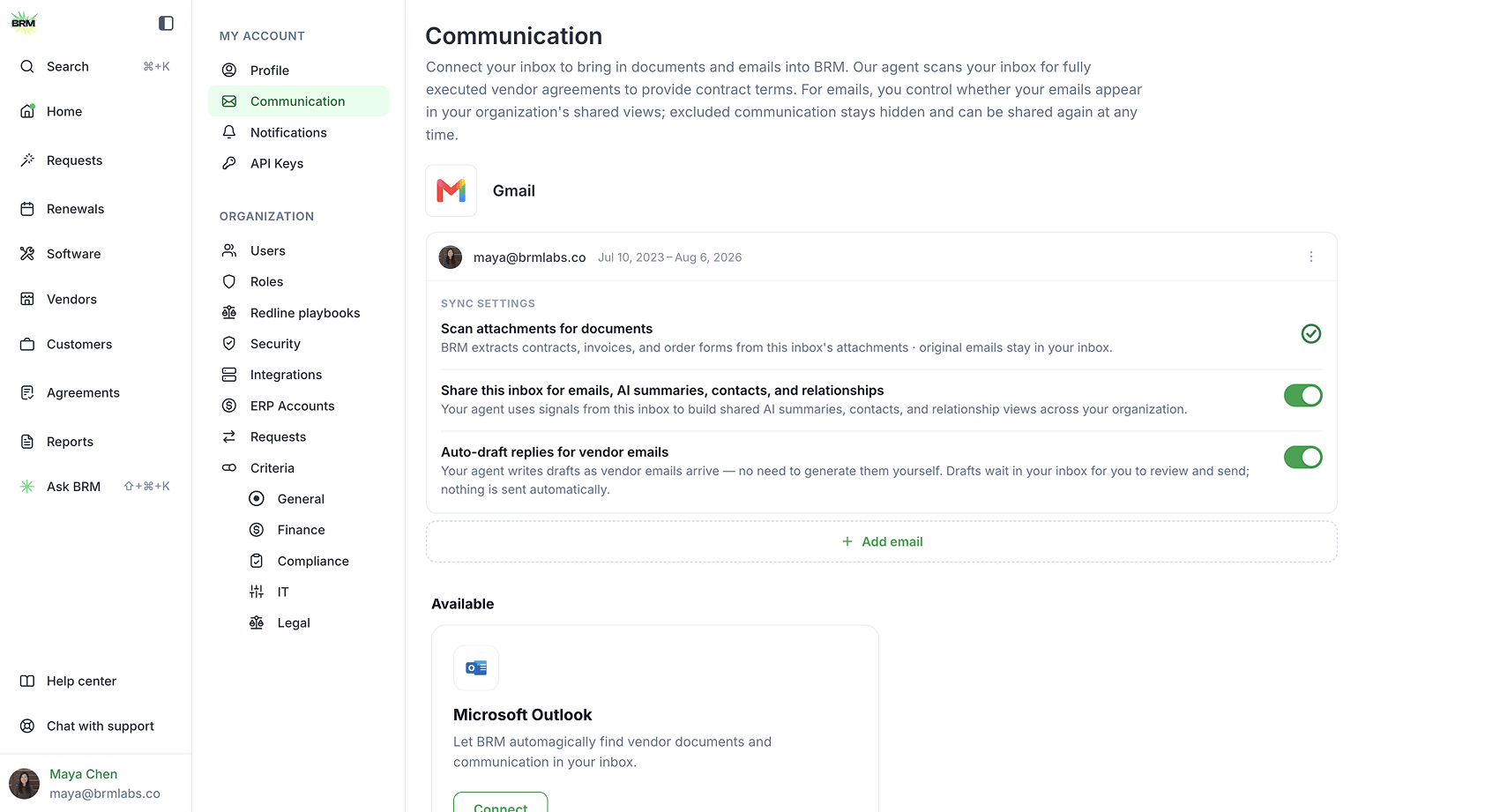
Setup takes about two minutes.- Log in to BRM
- Go to My Account, then Communication
- Connect your inbox. Gmail or Microsoft Outlook, whichever you use for vendor correspondence. Connecting runs through your provider’s sign-in and takes about 30 seconds. If you already connected an inbox for Contract Collector, you will need to reconnect your inbox to enable auto-drafting and email sending.
- Toggle on “Share this inbox for email drafts, AI summaries, contacts, and relationships.” Attachments only keeps things as they were, with BRM pulling in contracts and documents but leaving the conversation out. Attachments + vendor communication surfaces the content of your vendor threads on the relevant Relationship pages, where your team can see them.
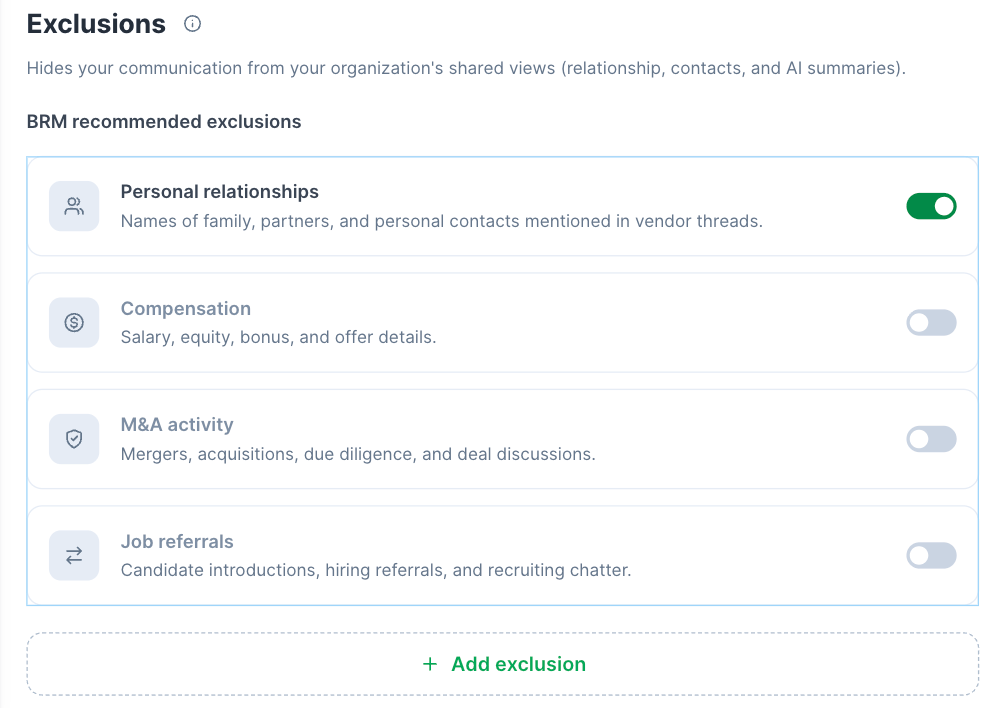
- Set your exclusions. BRM suggests a starting set based on what most teams keep private. Review them and add any addresses or domains of your own. More on this below.
What You’ll See
1. The Full Conversation, in Context
Email threads appear as events in the Relationship activity timeline, in chronological order, alongside payments, logins, and agreement dates. Each shows the real subject line and the inbox it arrived in. The renewal conversation that started six months before the contract date. The escalation that got resolved. The commitment a CSM made over email that never made it into an amendment. All of it in sequence, on the page where the contract and the spend already live. This is what gives every other capability on this page its value. The drafts are good because the context is complete.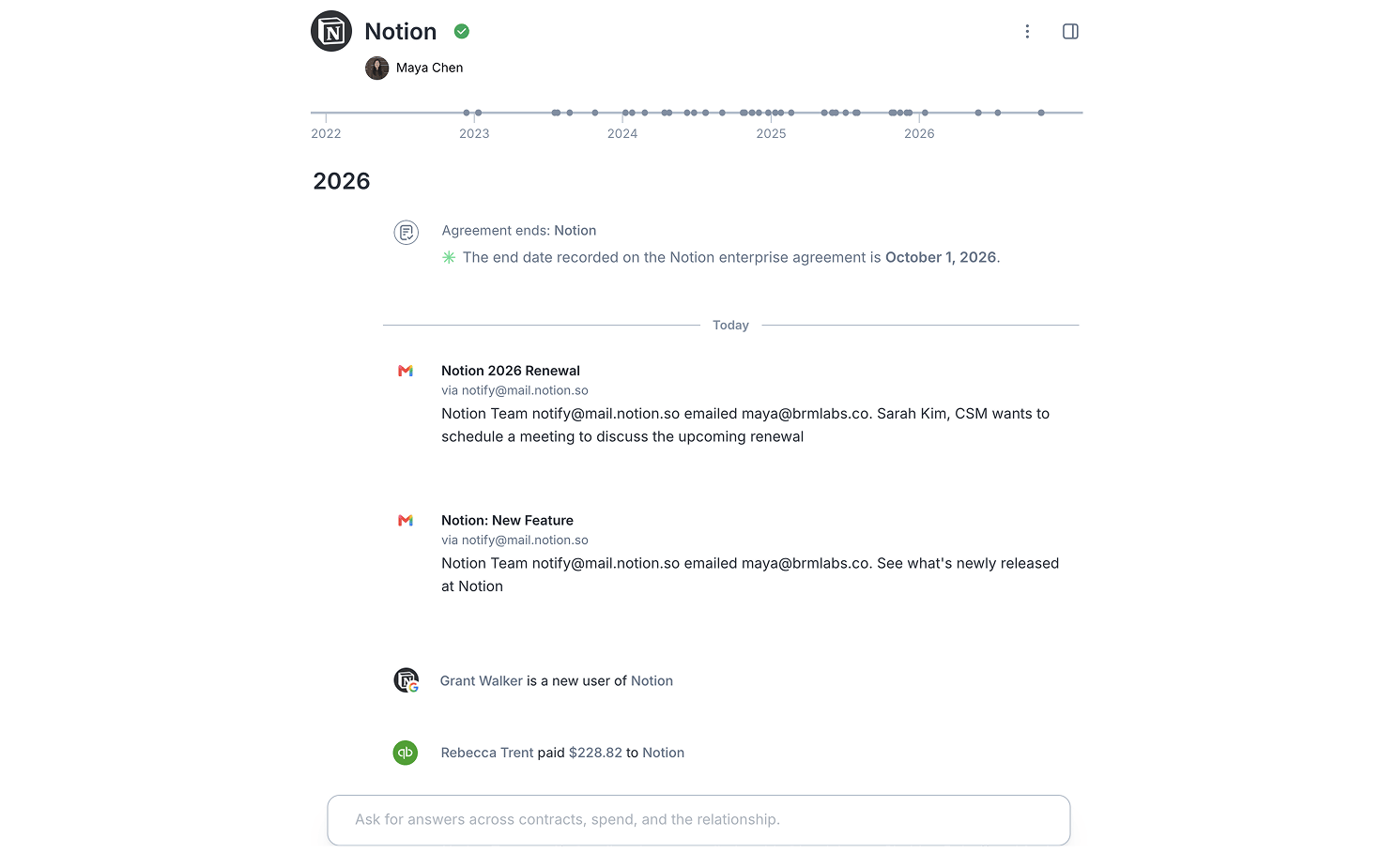
2. Agents That Know the Relationship
“Push back on the 12% increase and ask for a two-year term.” BRM’s agents are trained on the Relationship in front of them. They draft from the agreement, the spend trajectory, and every previous exchange with that vendor, rather than from the last message in the thread, which is all a normal email client can see. Sometimes the agent gets there first. Where BRM has already recognised something that needs a response, the thread opens with a draft ready to go. Adjust it by editing directly or by telling the agent what to change. Generated replies default to Reply all, with recipients editable before you send. The result is that renewal prep, price pushback, and chasing an overdue answer all start from a first draft that already reflects the Relationship, instead of a blank reply window and twenty minutes of research..png?fit=max&auto=format&n=Cplji1Wok1fNmg6-&q=85&s=d2cf8d4683c7207e2fc4771d75932992)
3. Reply to the Vendor Without Leaving the Page
Reply, reply all, and forward, all from the Relationship. The composer can be placed between messages in a thread, so you can respond in the right place in a long chain. Attachments are listed on each message and open in the main Relationship pane while the thread stays open beside them, so a contract sent over email is one click from the record it belongs to. Recipients stay editable throughout, so you can add a colleague to a vendor thread or take someone off it before sending.4. Bring Your Team In Before You Send
Comment underneath any individual message in a thread, or on the email event itself. Comments are visible to your team and stay attached to that message, which is how you flag a specific line in a vendor’s reply rather than commenting on the Relationship as a whole. The renewal notice arrives. You comment asking a teammate to pull the usage numbers before anyone responds. The exchange sits with the email that prompted it, so the next person to open the thread inherits the thinking as well as the facts. Nothing moves to Slack and gets lost.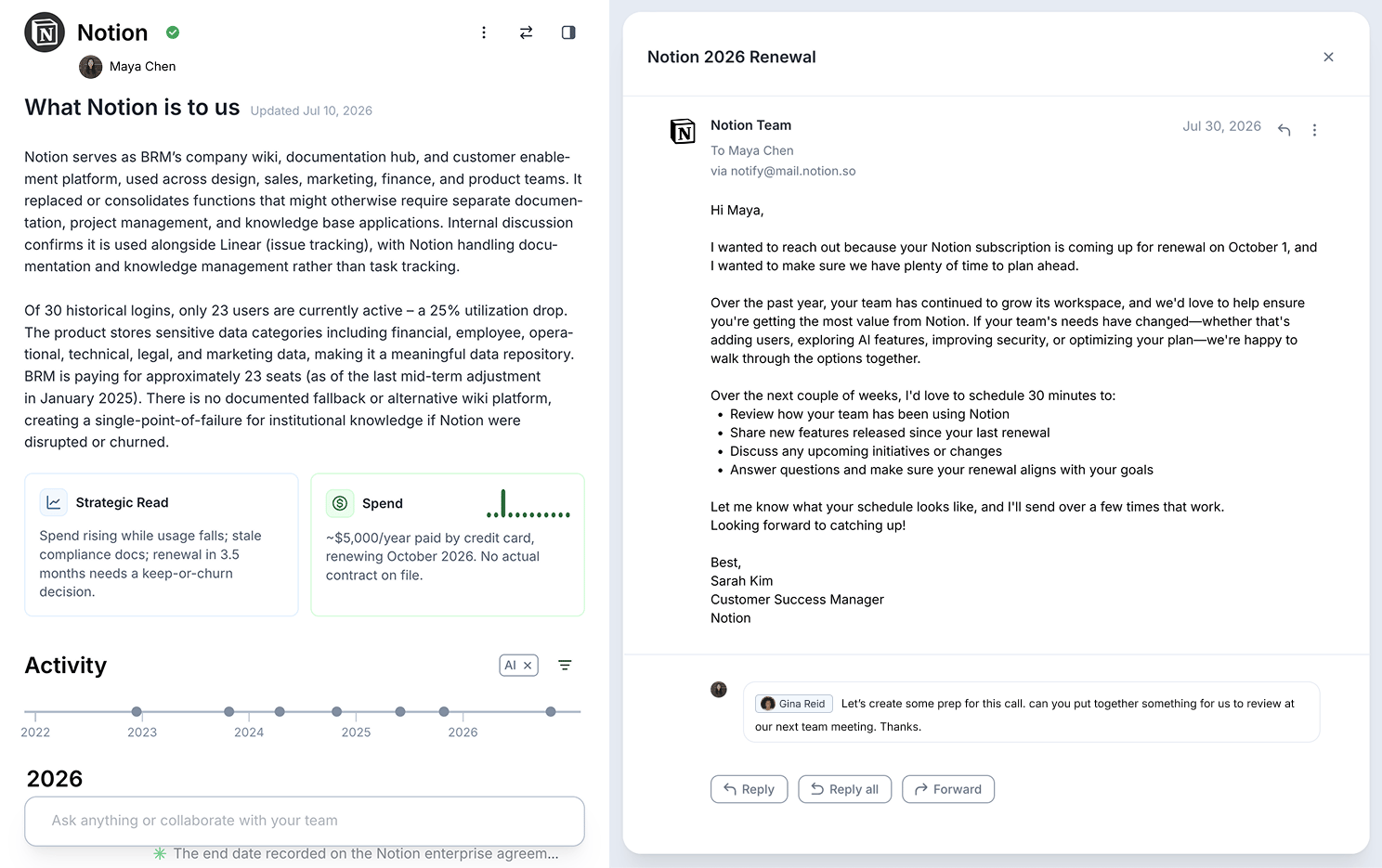
5. Contacts: Two Controls, One Menu
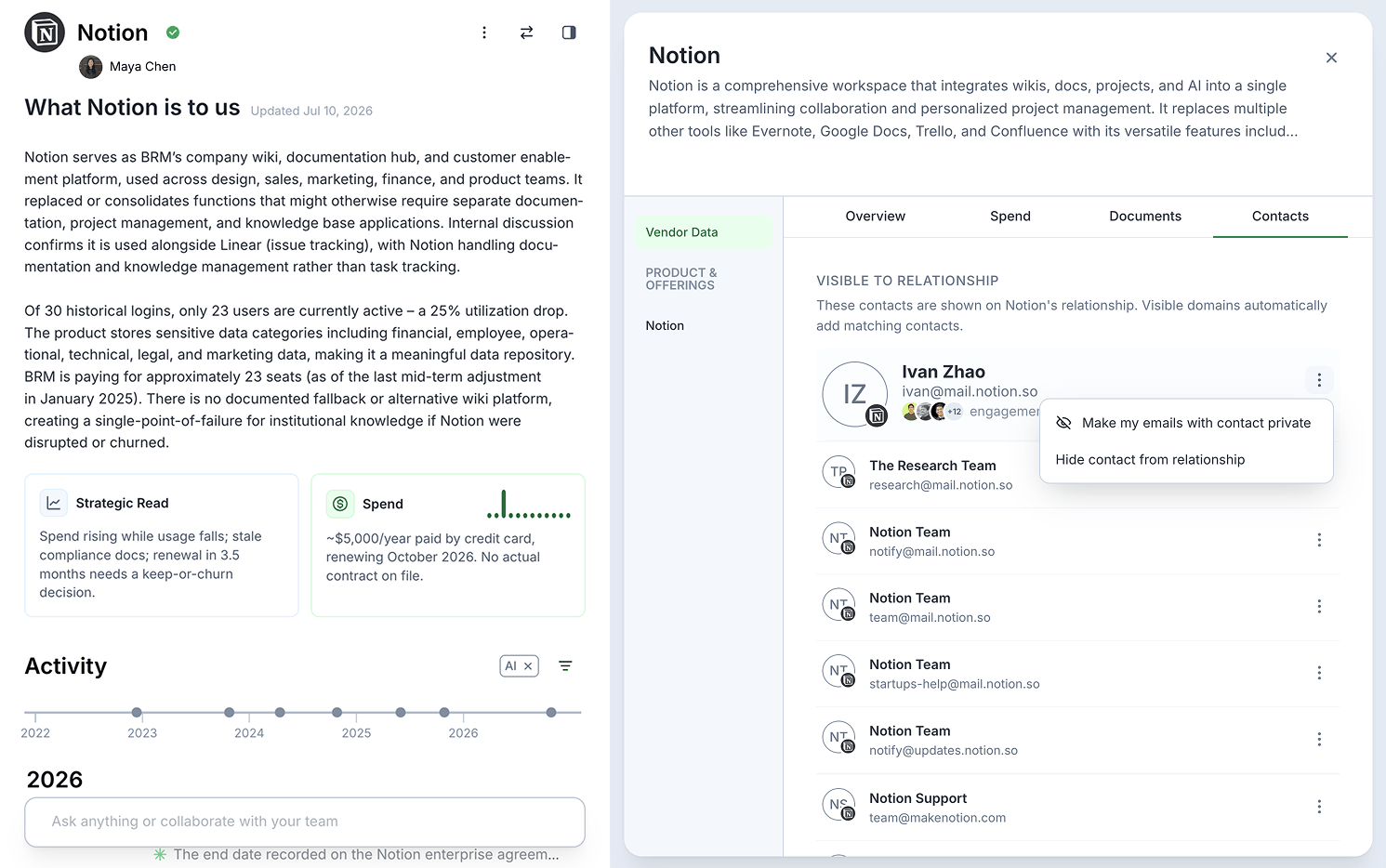
The Contacts tab in the Relationship details panel is the answer to “why is this email here?” An email appears on the Relationship because a contact or a domain in this list matches one of its participants. Change the list and the timeline changes with it, including for correspondence already in BRM. Named people sort to the top. Role mailboxes and automated senders sort below them. Each row shows where BRM learned about the contact and when it was last active. Visible domains automatically add matching contacts, so adding a vendor’s primary domain is the fastest way to populate a quiet Relationship. Open the menu on any contact, and you get two options:- Make my emails with contact private. Your side of the conversation stops being shared with your organization. Use this when the correspondence is vendor-related and still yours.
- Hide contact from relationship. That contact’s email stops appearing in the Relationship feed for everyone. Use this for the marketer sending campaign email or the system sending automated notifications. The contact stays on file, so anyone looking for someone to reach out to can still find them.